Build a high-converting abandoned cart flow in Klaviyo, step-by-step setup, triggers, timing, and copy that recovers lost revenue.
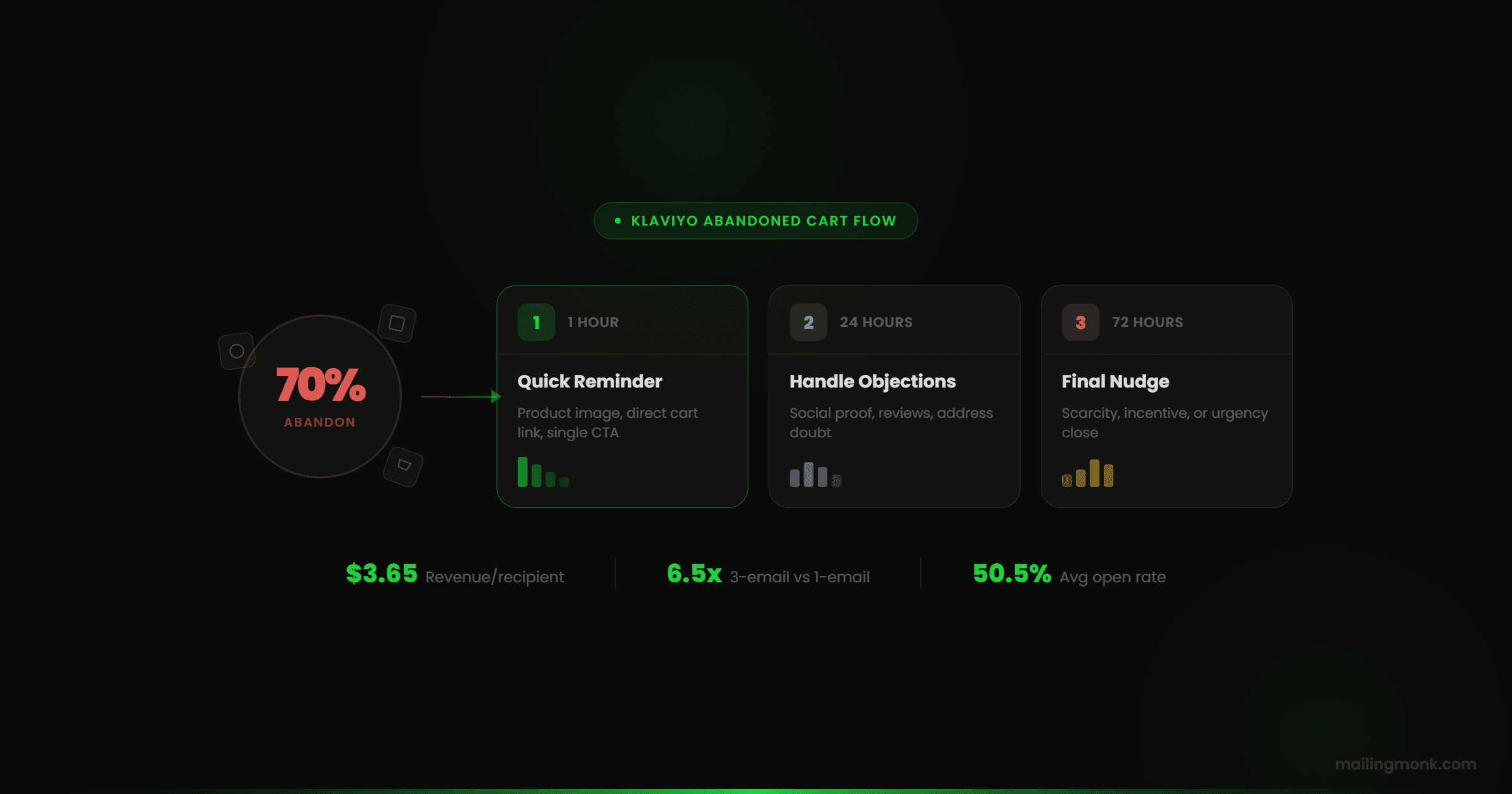
Seven out of ten shoppers who add something to their cart never buy it. That's not a leak in your store. It's the baseline reality of e-commerce. According to the Baymard Institute, which has tracked cart abandonment across thousands of studies, the average abandonment rate sits at just under 70%. On mobile, it's closer to 85%.
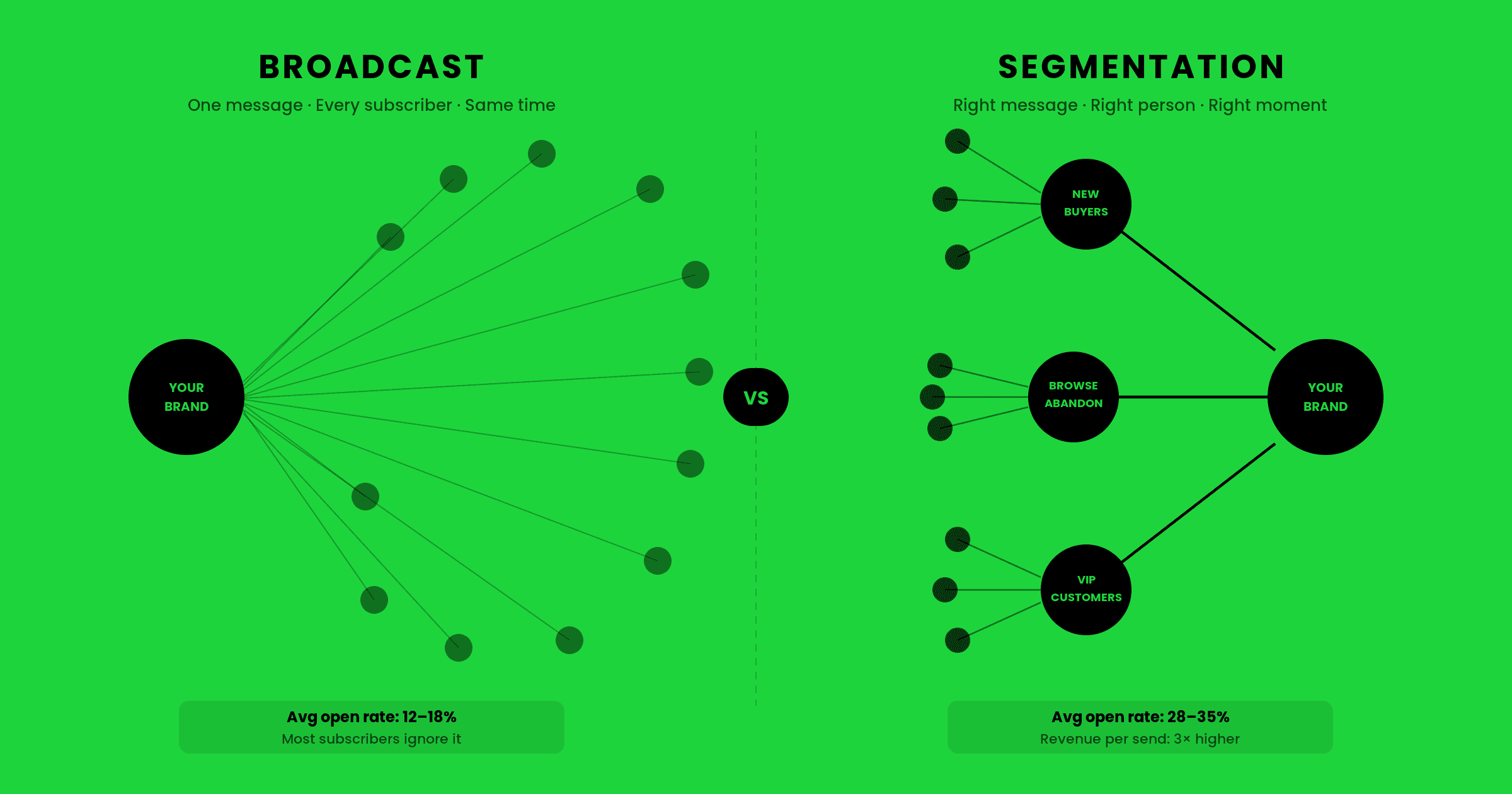
Most brands accept this as the cost of doing business. The ones that don't, the ones building abandoned cart flows that actually recover customers, can generate 10-15% of their total email revenue from a single automation. No campaigns required. Just a sequence that runs in the background, every day, targeting the exact moment someone almost bought.
This guide covers how to build that sequence in Klaviyo. Not just how to click through the flow builder, but how to think about it: triggers, timing, filters, copy, and the logic that separates a flow that converts from one that annoys people into unsubscribing.
What Is an Abandoned Cart Flow (and Why It Drives Real Revenue)
An abandoned cart flow is a series of automated emails triggered when someone adds items to their cart and leaves without completing purchase. Klaviyo fires it automatically, no manual work required, every time a qualifying event happens.
What makes it so valuable isn't just the timing. It's the intent signal. Someone who abandons a cart already said "yes" to your product. They picked it out. They put it in the cart. The only thing between them and a purchase is friction, distraction, or doubt. Your job with the cart flow is to remove whichever of those three is in the way.
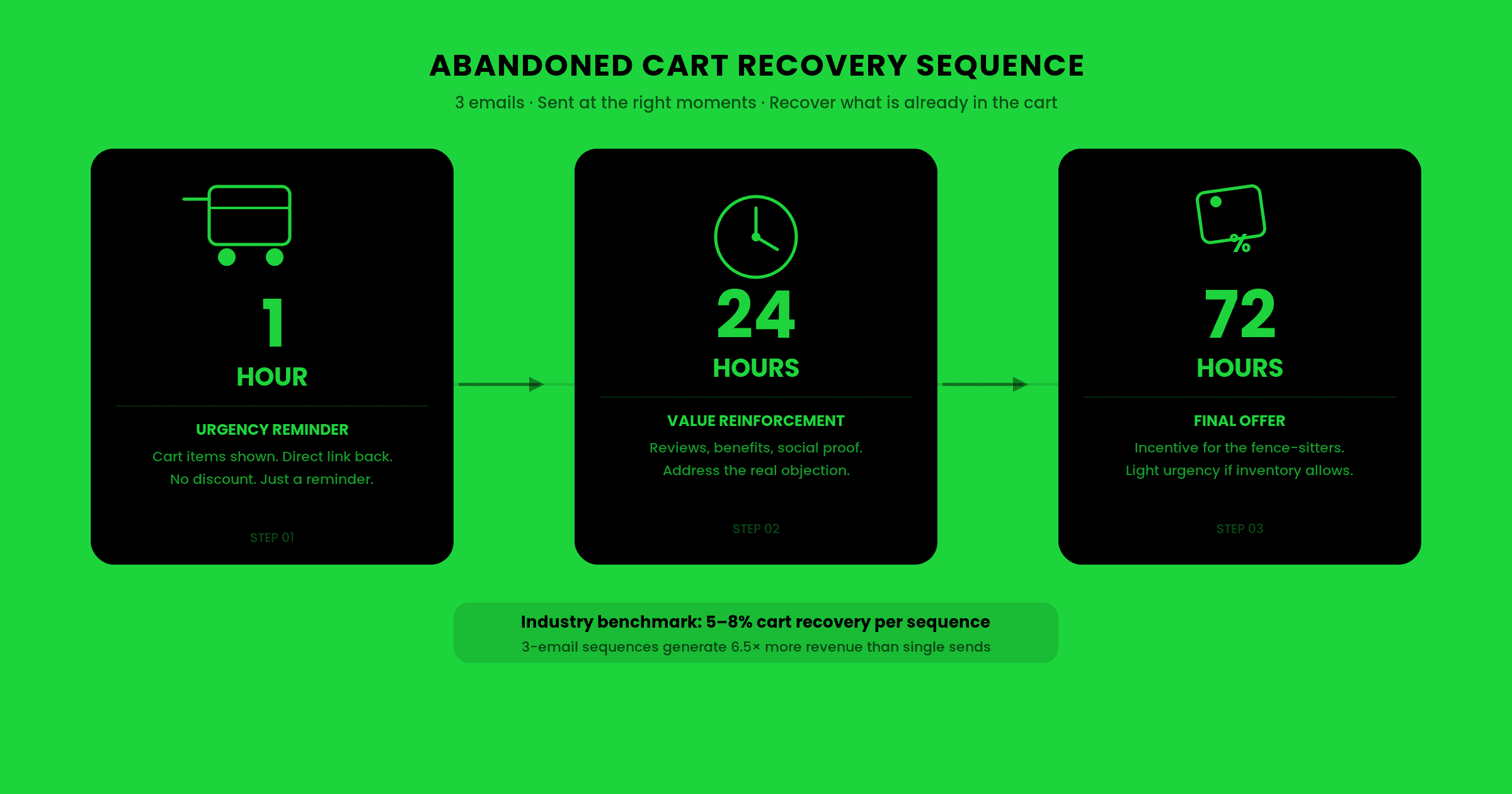
A 3-email abandoned cart sequence typically outperforms a single reminder email by a wide margin. The first email catches the distracted shopper. The second handles hesitation. The third (if you choose to send one) addresses the undecided buyer who needs either social proof or a final nudge. Together, they work on the same person across different mental states, and that's why they convert.
Checkout-Started vs. Added-to-Cart: Which Trigger to Use
Klaviyo offers two primary triggers for cart recovery: Added to Cart and Checkout Started. They're not the same thing, and choosing the wrong one will either over-email your list or miss your highest-intent shoppers.
Checkout Started fires when someone enters the checkout funnel, meaning they've clicked "Proceed to Checkout" and typically entered their email. This is the higher-intent event. The person has moved past browsing into buying mode. If you only build one cart flow, this is the trigger to use.
Added to Cart fires earlier, when someone drops an item into the cart but hasn't necessarily started checkout. It's a broader signal. Some of these people are wishlist-builders or researchers. They're not close to buying. Sending them a cart recovery sequence can feel pushy and may hurt your relationship with cold browsers.
The practical recommendation: start with Checkout Started. Once your flow is performing well and you have enough data, you can layer in an Added to Cart flow with stricter suppression rules (more on that below). Many brands with mature email programs run both, but they're careful to suppress anyone already in the Checkout Started flow from receiving the Added to Cart emails simultaneously.
Klaviyo's guide to abandoned cart email setup explains the technical configuration for both trigger types and how Klaviyo tracks cart events via its JavaScript tracking snippet.
Before You Build: Three Things Klaviyo Needs to Track Carts
The most common reason abandoned cart flows don't fire correctly isn't flow logic. It's missing setup upstream. Check these three things before you touch the flow builder.
1. Klaviyo's JavaScript snippet is installed on your store. Klaviyo can't track cart events without its pixel running on your site. On Shopify, this usually installs automatically via the Klaviyo app. On other platforms (WooCommerce, BigCommerce, headless setups), it often needs manual implementation. If you're not sure, go to Klaviyo, then Integrations, and verify your site activity is tracking pageviews and events.
2. Cart data is being passed to Klaviyo. Seeing "Checkout Started" events in Klaviyo's metrics isn't enough. You need to verify that the event includes the item-level data (product names, images, prices, URLs). This is what populates your dynamic product block in the email. Without it, your cart email shows up empty or falls back to generic copy. Test this by adding an item to cart on your own store and checking the event details in Klaviyo's activity feed.
3. Your list has opted-in emails to target. Cart events are tied to identified profiles, meaning people Klaviyo already has an email address for. Anonymous browsers who haven't given you their email can't receive cart emails. This is one reason why list growth and abandoned cart performance are linked. More known shoppers means more recoverable carts. Shopify's research on cart abandonment shows that capturing email at the top of checkout (before the shopper leaves) is one of the highest-leverage moves in e-commerce retention.
How to Build the Flow in Klaviyo: Step by Step
Once your tracking is confirmed, the build is straightforward. Here's how to set it up.
Go to Flows, then Create Flow, then Build Your Own. Select your trigger: "Metric" then "Checkout Started" (or "Added to Cart" if you've decided to go broader). Give the flow a clear name. "Abandoned Cart: Checkout Started" works fine.
Add a Time Delay before your first email. The standard recommendation is 1 hour after the trigger event. You want to give the person a chance to complete their purchase organically before you follow up. Some brands use 30 minutes, but 1 hour tends to perform better because it catches people who stepped away temporarily rather than people still in the middle of buying.
Add your first email after the delay. This email is a reminder, not a pitch. Keep it focused: here's what you left behind, here's a direct link back to your cart. Product images, item name, price. One CTA. If your average order value is above $80, this email alone will often recover the sale.
Add a second Time Delay of 22-24 hours after the first email. Then add your second email. This one should do more work than the first. Acknowledge that they came back but haven't purchased yet. Address the most common objection for your product category. If it's apparel, that's usually sizing or fit uncertainty, so include a sizing guide link or a returns policy callout. If it's supplements or consumables, it's usually "is this right for me" doubt, so include social proof, reviews, or a benefit reminder.
The third email is optional and depends on your brand and margins. If you choose to send one, give it 3-5 days after the second email. This is where some brands introduce a discount or free shipping offer to close the undecided buyer. Be strategic here: train too many customers to wait for a discount and you erode your margins over time. If you use a discount in the third email, cap it with an expiry ("expires in 24 hours") and don't repeat it in every cart flow forever.
Filters and Suppression Rules That Protect Your List
A cart flow without good filters is a machine for annoying people. Every abandoned cart flow should include suppression conditions that stop emails from sending when they're no longer relevant.
Suppress if order is placed. This is the most critical filter. Add a flow filter on every email in the sequence: "Has placed order zero times since starting this flow." Without this, Klaviyo will continue sending cart emails even after someone purchases. This is the number one cause of angry unsubscribes from cart flows.
Suppress if cart is empty. Add a flow filter for "Active on Site zero times in the last X days" combined with cart event recency checks if your cart platform supports passing live cart state. The goal is to avoid emailing someone about items they've already removed.
Suppress if already in another cart flow. If you run both Checkout Started and Added to Cart flows, add a filter to each: "Is in flow [other flow name] = false." This prevents the same person from receiving both sequences simultaneously.
Consider frequency caps for high-volume stores. If someone abandons multiple carts in a single week (not uncommon for frequent shoppers), you don't want to send them 6 cart emails in 7 days. Klaviyo's Smart Sending feature handles some of this, but you may want to add explicit filters based on email volume received in recent days.
Timing: When to Send Each Email
The research on abandoned cart email timing is fairly consistent across the industry. Here's what the data supports:
Email 1: 1 hour after abandonment. This is your highest-converting email in the sequence, typically by a significant margin. Open rates for first-touch cart emails sent within an hour are noticeably higher than emails sent at 3+ hours. The customer is still mentally warm. They haven't moved on to a dozen other things yet.
Email 2: 23-24 hours later. Roughly the same time of day as the first email, the following day. This catches the person in the same behavioral window. If they abandoned at 7pm Tuesday, your second email arrives around 7pm Wednesday when they're likely in the same mental state and on the same device.
Email 3 (if using): 3-5 days after email 2. This is for the genuinely undecided buyer. Too early and it feels like pressure. Too late and the moment has passed. Three days is a reasonable sweet spot for most categories. Five days works better for higher-ticket items where the decision cycle is naturally longer.
One thing worth noting: don't send abandoned cart emails on days your list typically has low engagement. If your analytics show that Saturday morning is a dead zone for opens, adjust your timing or add a day-of-week send condition to push emails to higher-engagement windows.
Writing Abandoned Cart Copy That Doesn't Feel Desperate
Most abandoned cart emails are bad. They either beg ("You forgot something!") or are so generic they could have been sent by any store on the internet. Neither approach respects the customer's intelligence, and neither converts as well as copy that treats the reader as an adult who has a real reason for not completing the purchase.
The job of abandoned cart copy is not to remind someone they left (they know). It's to remove the specific friction that stopped them from completing the purchase.
For email 1, keep it clean and direct. Subject line examples that work: "You left something behind," "Still thinking it over?" or simply the product name. The body should show the item, confirm it's still available, and make the return path frictionless with one clear CTA button. No essay required.
For email 2, earn the space you're taking in someone's inbox. Pick a real objection and address it. "Our return policy is 30 days, no questions asked" if hesitation is about fit or quality. "Here's what customers who bought this say" if social proof is the missing piece. "Here's why this works" with a specific mechanism if your product requires explanation.
Subject lines that convert in email 2 tend to be a little more personal: "Still on the fence?", "A few things people ask before buying [Product Name]", or a direct question about the most common hesitation. Avoid subject lines that reference discounts unless you're actually including one. Teasing a discount and then not delivering it destroys trust immediately.
For real-world examples of abandoned cart emails that get the copy right, Really Good Emails' abandoned cart collection is worth browsing before you write yours. Pay attention to brands that have high review counts. It's usually a signal that the email has been widely shared because the copy is genuinely good, not just passable.
One pattern worth avoiding: the wall of copy. We've audited hundreds of Klaviyo accounts and the abandoned cart emails with the longest copy almost always have the lowest click rates. Keep it short. One product block. One piece of copy that handles one objection. One CTA. The goal is a click, not a conversion from email copy alone. Your store page does the closing.
What High-Converting Abandoned Cart Flows Actually Look Like
There's no single template that works for every brand, but the structural patterns of high-performing flows are consistent. Here's what they share.
They match the product price point to the email effort. A $25 impulse item doesn't need three emails and a discount. A $250 supplement or a $400 piece of gear might. Calibrate your sequence length and copy depth to how much deliberation the purchase actually requires.
They use dynamic product blocks properly. The email should show the exact item the customer left behind: full image, product name, variant (size, color, flavor), and price. If the product block breaks and shows nothing or shows the wrong item, the email feels like spam. Test your dynamic blocks before turning the flow live by placing a test order on a Klaviyo-identified profile.
They treat returning customers differently from first-time shoppers. Someone who has already bought from you three times doesn't need the same cart email as someone who found your store through an ad yesterday. Klaviyo's conditional splits let you serve different content to each. A returning customer might get a shorter, more casual email ("Forgot something? Grab it here."). A new visitor might get a longer email with social proof and a returns policy reminder.
E-commerce brands that get this right, whether they're based in Philadelphia or Kansas City, share one thing in common: they treat returning customers as a distinct audience with a distinct email. In our experience auditing Klaviyo accounts, cart flows using conditional splits for new vs. returning customers consistently outperform one-size-fits-all sequences, often by a meaningful margin on revenue per recipient.
Finally, they connect to the broader retention strategy. An abandoned cart email shouldn't be the end of the journey. If someone clicks the cart email but still doesn't purchase, they should flow into a browse abandonment sequence or a general nurture sequence. The customer showed buying intent twice. They deserve a more complete follow-up strategy than just three cart emails and then silence.
Getting Your Klaviyo Tracking Right Before You Launch
A final note before you hit Activate on the flow: QA your setup end to end before going live. The single biggest mistake we see brands make with abandoned cart flows is activating them before verifying that all the pieces work together.
Run through this checklist before launch. First, verify that Checkout Started events are appearing in your Klaviyo activity feed by walking through checkout on your own store with a test email address already in Klaviyo. Second, check the event properties and confirm the item name, image URL, price, and product URL are all present in the event payload. Third, send test emails to yourself and check that the dynamic product block renders correctly. Fourth, confirm your suppression filters are in place on every email in the sequence. Fifth, turn the flow live with Smart Sending enabled and monitor the first 48 hours of performance.
If the flow isn't firing, the most common culprit is the tracking snippet, specifically the Klaviyo identify call not firing before the cart event. This means Klaviyo receives the cart event but can't tie it to an identified profile, so the flow never triggers. Your developer or the Klaviyo integration documentation can help diagnose this if you're seeing events appear without profile associations.
A well-built Klaviyo abandoned cart flow is one of the few marketing investments where the ROI is both immediate and compounding. Get it right once, and it runs in the background recovering revenue every single day while you focus on everything else. That's what good email infrastructure does. It doesn't just send emails. It earns money while you sleep.

Our mission is simple: help brands grow through better emails. We focus on strategy, design, and data to turn the inbox into a high-performing sales channel; without the noise. We believe great email marketing is clear, personal, and built to last.